

MCP for coding agents
--mcp gives a coding agent the same database you browse, over the Model Context Protocol on stdio.
npx tablewalk ./data/app.db --mcpUntil the browser-only release is published,
npx tablewalk@nextis the current build.
Connecting an agent
Section titled “Connecting an agent”Most clients take a server as a command and its arguments:
{ "mcpServers": { "tablewalk": { "command": "npx", "args": ["tablewalk", "--mcp", "--config", "./tablewalk.json"] } }}Or name one database instead of a config file: "args": ["tablewalk", "--mcp", "--db", "postgres://localhost/app"]. In Claude Code:
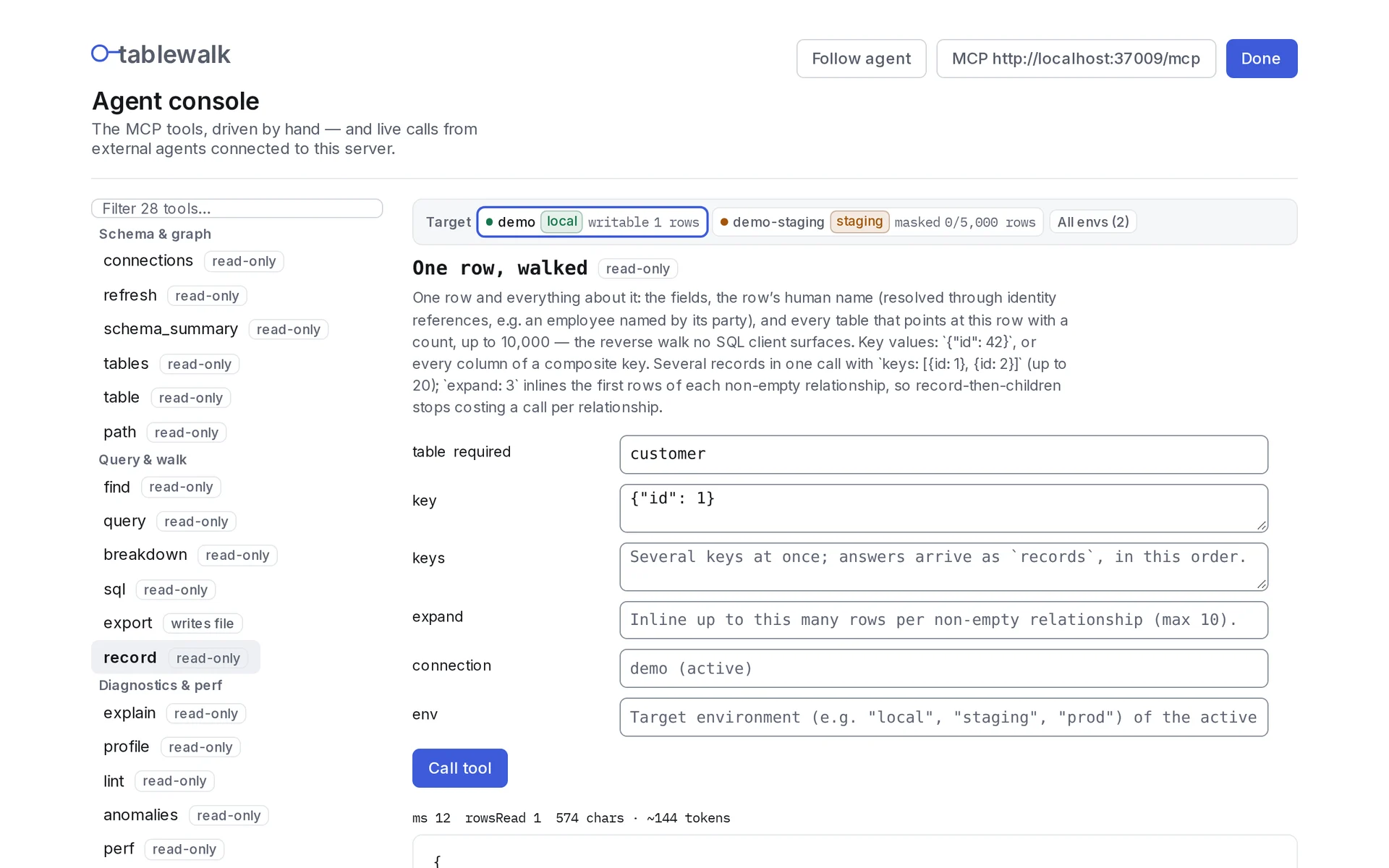
claude mcp add tablewalk -- npx tablewalk --mcp --db postgres://localhost/appEvery answer carries a link the person beside the agent can open in the page, and says what it cost in rows and milliseconds. When tablewalk is running locally in the browser, external MCP clients can also connect directly over Streamable HTTP at http://localhost:4111/mcp (or bridge stdio via TABLEWALK_MCP_URL=http://localhost:4111/mcp) so the browser and the agent share one connection pool, Undo stack and live activity trail — surfacing a live MCP · N pill in the top bar as calls arrive. Open Agent console from that pill, the ··· menu or ⌘K (where all tools are searchable and grouped into five workflow sections, with All envs fan-out across sibling environments and a Follow agent toggle that navigates the browser automatically along incoming MCP links), pick Copy brief for agent to copy the current view, or run npx tablewalk --export agent >> CLAUDE.md to generate a compact operational brief of your connections, guardrails, hub tables, foreign keys and fast CLI lookups.
Vault configs, leases and fast agent lookups
Section titled “Vault configs, leases and fast agent lookups”When credentials live in a secret vault, pipe a JSON config straight into tablewalk so secrets stay in memory and connections close automatically when the agent finishes:
# MCP session over a vault config with lazy startup, a 5-minute lease, and zero-PII JSONL audit receipts{ vault get db/billing-staging; cat; } | npx tablewalk --mcp --config - --env staging --lease 5m --audit-log stderr
# Process substitution, compact TSV/Markdown one-shot lookups, cross-env fan-out, or multi-call NDJSON batchnpx tablewalk --config <(vault get db/billing) --env staging --query "invoice status = open limit 10" --format tsvnpx tablewalk --config <(vault get db/billing) --call breakdown --args '{"q":"invoice count by status"}' --all-envs --format md{ vault get db/billing; cat calls.jsonl; } | npx tablewalk --config - --batch - --redact --max-rows 5000
Piped JSON configs can include "secrets" (or .env text under "dotenv"), "credentialCommand" to mint short-lived tokens on open and after idle eviction, "environments" tier defaults ("local", "staging", "prod"), "active": "billing@staging", "only": true to expose only the selected target, "lazy": true (default for piped --mcp configs so initialize and tools/list answer before dialing the database), "lease": { "idleSeconds": 30, "maxSeconds": 300 }, "timeoutMs", "focus" / "focusHops", "redact": true / "redactColumns", "maxRows", and "blocklist": { "tables": ["audit_*"], "fields": { "*": ["*_token"], "customer": ["tax_id"] } }.
The tools
Section titled “The tools”Twenty-eight tools: twenty-two read-only, and six writes that are listed only when a connection is "writable": true. Every tool also takes connection (an id, "db@env" such as "billing@staging", or "@staging" relative to the active database) and optional env ("local", "staging", "prod") when multiple environments are configured, and single-connection read-only tools accept envs: "all" or envs: ["local", "staging"] to fan out in parallel across sibling environments while honoring each tier’s guardrails. Connections can declare "database" and "env" in tablewalk.json or rely on naming conventions (billing-local, billing_staging, billing [prod]); when a prod environment is active, write tools refuse implicit calls unless connection or env: "prod" is passed explicitly.
Reading
Section titled “Reading”| Tool | What it answers | Example arguments |
|---|---|---|
connections |
The configured connections: name, dialect, table count, environments, redaction posture and session row budget. The call to start with. | {} |
refresh |
Re-reads a connection’s schema after a migration. | {} |
schema_summary |
Orientation in one call: the hubs, the event tables, the join tables, the deepest chain of references. | {} |
tables |
Every table with its column count, approximate rows, and whether it is a view. | {} |
table |
One table in full: columns, keys, DDL, and its foreign keys in both directions. | {"table": "invoice"} |
path |
Shortest foreign-key paths between two tables across to-one and to-many hops, flagging unindexed reverse joins with CREATE INDEX DDL and queryHint. |
{"from": "invoice_line", "to": "country"} |
find |
Where a name or a value lives, across every table and column. | {"value": "Harbour Freight"} |
query |
Rows from the query language or a named view in tablewalk.json, a total, and the SQL it compiled to. |
{"q": "invoice total > 500 sort total desc", "limit": 10} |
breakdown |
Counts and sums grouped by something. | {"q": "invoice count by status"} |
record |
One row, its human name, and everything that points at it. | {"table": "customer", "key": {"id": 1}} |
sql |
A read-only SELECT or a named saved query from tablewalk.json. |
{"statement": "select status, count(*) from invoice group by 1", "timeout_ms": 2000} |
export |
A query, view, sql or saved result written to a file (csv, ndjson or json; optionally gzipped and redact: true). |
{"query": "invoice status = open", "format": "ndjson", "redact": true} |
explain |
The planner’s account of a statement, without running it. | {"statement": "select * from invoice where customer_id = 1"} |
profile |
What a table’s columns hold: null share, distinct count, range, common values. | {"table": "invoice"} |
diff |
How two connections’ shapes differ: tables, columns, types, keys, delete rules. | {"from": "staging", "to": "production"} |
order |
What has to exist first: tables in insert order, and the reverse for teardown. | {"tables": ["invoice_line", "customer"]} |
fixture |
One real row and everything it needs to exist (with optional redact: true masking), ready for insert_graph. |
{"table": "invoice", "key": {"id": 1001}, "children": true, "redact": true} |
lint |
What the shape will cost: keyless tables, unindexed foreign keys, naive timestamps. | {"severity": "high"} |
perf |
Live index, scan, bloat, planner-statistics and lock/session contention diagnostics (pg_stat_user_tables, pg_stat_user_indexes, pg_stat_activity, pg_locks and pg_blocking_pids on PostgreSQL; PRAGMA index_list, EXPLAIN QUERY PLAN and sqlite_stat1 on SQLite) with ready-to-run remediation SQL. |
{"severity": "medium"} |
anomalies |
Data-level counterpart to lint: temporal inversions, dangling soft-delete lifecycles, negative unsigned business measures (total, quantity < 0), future-dated audit timestamps (> tomorrow), and >=95%-populated nullable FKs with null outliers. |
{"severity": "high"} |
change_impact |
What breaks if a table or column changes, asked before writing the migration. | {"table": "customer", "column": "email"} |
verify_ddl |
Runs candidate DDL in an isolated SQLite copy or rolled-back PostgreSQL transaction and returns diff plus newly introduced lint findings. |
{"sql": "ALTER TABLE invoice ADD COLUMN po_number text"} |
Writing
Section titled “Writing”Listed only when a connection is "writable": true, and refused on any other connection.
| Tool | What it does | Example arguments |
|---|---|---|
update |
Sets columns on exactly one row (dryRun: true checks inside BEGIN … ROLLBACK). |
{"table": "invoice", "key": {"id": 1001}, "set": {"status": "paid"}} |
insert |
Adds one row and answers with what the database stored (dryRun: true rolls back after inspecting defaults and keys). |
{"table": "country", "values": {"code": "IS", "name": "Iceland"}} |
delete |
Removes one row in two calls: the first reports what points at it, the second confirms. | {"table": "invoice", "key": {"id": 1001}, "confirm": true} |
insert_graph |
Inserts related rows in one transaction, all or none (dryRun: true validates and rolls back). A row names its parent by label. |
{"rows": [{"table": "customer", "as": "c1", "values": {"name": "Dry Creek"}}, {"table": "invoice", "values": {"customer_id": {"ref": "c1"}, "invoice_date": "2026-11-02", "total": 99.5}}]} |
delete_graph |
Removes several rows in one transaction, children first. | {"rows": [{"table": "invoice", "key": {"id": 1908}}], "confirm": true} |
revert |
Shows the last write, then undoes it when confirmed with that preview’s id. | {"confirm": true, "expectedId": 12} |
delete and delete_graph ask the person directly when the client supports it (MCP elicitation), and then ignore a confirm the model supplies. insert_graph and delete_graph are not journaled, so revert cannot undo them; delete_graph with the teardown an insert returned is the way back. A raw SQL write has no undo.
Exporting data
Section titled “Exporting data”export is for more rows than fit in a reply. It streams the result to a file and answers with the file’s absolute path, row and byte counts, the columns, five sample rows, and a line on how to load it, so the rows never pass through the agent’s context. The agent then reads the file with its own tools: DuckDB, Python, head.
- Files land in
tablewalk-exportsunder the system temp directory, named<connection>-<name or table>-<yyyyMMdd-HHmmss>.<ext>(UTC). An existing file is never overwritten, and a caller cannot choose the directory. - Give exactly one of
query(the query language),view(a named view fromtablewalk.json),sql(a read-onlySELECT), orsaved(a named query fromtablewalk.json).formatiscsv(default),ndjsonorjson;limitcaps the rows;namesets the file stem;compress: "gzip"writes.csv.gzor.ndjson.gz;redact: truedeterministically masks emails, phones, names, addresses and secrets in both the file and the sample. - A
queryexport pages through the whole result by key in batches of 5,000 rows on SQLite and 25,000 rows on PostgreSQL (prefetching the next batch while writing), with no ceiling beyondlimit. A query that cannot page by key (a view over references, a union) reads by position and stops at 100,000 rows, and says so. Asqlexport is one read capped at 100,000 rows; the answer says when it stopped short. - Ids past 2^53 stay strings, dates are ISO, and an empty CSV field is
null. At most two exports run at once.
{ "query": "invoice total > 500 sort total desc", "format": "csv", "name": "big-invoices" }Fewer tools for one job
Section titled “Fewer tools for one job”--tools lists one job’s worth of tools, which makes the listing an agent pays for on connect smaller. A profile only removes tools, and is enforced on every call, not only in the listing.
| Profile | Tools |
|---|---|
explore |
connections, refresh, schema_summary, tables, table, path, find, query, breakdown, sql, export, record, explain, profile, perf, anomalies |
migrate |
connections, refresh, schema_summary, tables, table, path, change_impact, lint, perf, anomalies, verify_ddl, order, diff, profile, explain |
seed |
connections, refresh, schema_summary, tables, table, path, order, fixture, record, query, insert, insert_graph, delete_graph, revert |
full |
all of them (the default) |
--output-schema adds each tool’s output shape to the listing. It is off by default because it doubles the listing’s size, and the answers carry the same fields either way.
Prompts and resources
Section titled “Prompts and resources”Four prompts: orient (schema brief + perf and anomalies pointers), pre-migration-check (takes tables, runs change_impact and guides verify_ddl), investigate-row (takes table and key, guides record with expand and fixture with redact: true), and compare-environments (takes from and to, pre-computing diff across tiers). Resources an agent can read without running anything:
tablewalk://{connection}/schema, the schema brieftablewalk://{connection}/table/{table}, one tabletablewalk://{connection}/views, the named multi-table views in your config filetablewalk://{connection}/queries, the named SQL in your config filetablewalk://{connection}/pages, page definitions from the config file and pages saved from the browsertablewalk://{connection}/page/{page}, one record page in full (root table, sections, fields, related lists and filters)
When a call fails
Section titled “When a call fails”A failed call is a normal result with isError: true and a sentence a model can act on. The sentence is for reading; to branch on it, read the _meta of the result, where tablewalk/code is one of:
| Code | Means | Usually |
|---|---|---|
read_only |
the connection is not "writable": true |
the operator’s to change |
not_found |
a table, connection or tool that does not exist | ask tables or connections |
timeout |
the statement ran into its 30-second cap | ask a narrower question |
cancelled |
the client withdrew the call | nothing; it is over |
invalid_argument |
an argument is wrong, missing or contradicts another | fix the call |
forbidden |
not allowed here: a tool outside --tools, one of tablewalk’s own tables, a capability the dialect lacks |
do not retry |
limit |
past a bound the tool or session sets, such as more than 20 keys in one call or an exhausted maxRows session budget |
take less |
internal |
anything else, the database’s or the server’s | read the sentence |
{ "isError": true, "content": [{ "type": "text", "text": "Cancelled: …" }], "_meta": { "tablewalk/code": "cancelled" } }Limits
Section titled “Limits”- Rows that enter an agent’s context leave your machine. Point agents at development databases, enable
"redact": true(--redact) and"maxRows"(--max-rows), or mark a connection"rows": falseso only the shape and bounded counts (lint,anomalies) answer. When every connection is shape-only,query,sql,record,breakdownandexportare not listed at all. When every connection hides or redacts columns,sql,explainandverify_ddlare not listed. - A statement runs under a 30-second cap;
sqltakestimeout_msto lower it (at least 100). A client that cancels a call stops its statement. - Totals from
queryandbreakdown, and counts onrecord, stop at 10,000 and say so. sql,explainandverify_ddlrefuse statements that touch tablewalk’s own tables (__mistri_*, themistrischema,__tablewalk_*,tablewalk_auth).